Assignments > HW6: From User Journeys to Wireframes (Part 1)
Due Tue, 03/17 at 11:59pm
The goal of this assignment is to design the structure of the application by considering the needs of the various stakeholders. You will do this by:
- Defining user journeys
- Identifying the screens required to support those journeys
- Identifying the features required on each screen
- Creating initial low‑fidelity wireframes for key screens
You will create one shared artifact per team: a single set of user journeys, screens, and features that you develop together (you can divide up pieces, but everyone should understand the whole). Each team should focus on one stakeholder – either parents, providers, or admins.
1. Define User Journeys
Select 3–5 important user needs for your stakeholder.
Template (Adjust as Needed)
Stakeholder:
_________________________User Need:
_________________________User Journey:
- User arrives at
_________________________- User sees
_________________________- User selects
_________________________- System shows
_________________________- User completes
_________________________Success State: The user has successfully
_________________________
Tips:
- For each need, describe the steps the user takes to accomplish their goal.
- A journey should describe actions, not interface design.
Requirements
- 3–5 journeys
- Each journey should contain 5–7 steps
- Focus on what the user does, not how the screen looks
2. Identify Screens
2.1. Convert each journey into a list of screens
Now convert your journeys into screens. Each step in a journey typically corresponds to a screen or interface state.
Example:
- “Parent logs in” → Login Screen
- “Parent views today’s activities” → Dashboard
- “Parent opens activity” → Activity Page
- “Parent completes activity” → Completion Screen
Do this for each journey.
2.2. Consolidate screens into a single list
After mapping journeys to screens, combine them into a single screen list, and remove duplicates.
Example:
- Login
- Dashboard
- Course Page
- Activity Page
- Quiz
- Progress Page
- Profile
This list represents the core interface of your application.
Tips:
- Try to reuse screens across journeys whenever possible. Most applications have a relatively small set of core screens that support many different actions.
- Your final screen list will likely contain 8–15 screens.
- Use clear, consistent names for screens (e.g., “Dashboard”, “Activity Page”, “Progress Page”). Avoid creating multiple names for the same screen.
Requirements
- For each journey, identify a sequence of screens that covers every step.
- Combine all screens into a single, de‑duplicated screen list.
- Aim for 8–15 unique screens for your stakeholder.
3. Define Screen Features
For each screen, list the key actions or capabilities it must support.
Template
Screen:
_________________________Features:
____________________________________________________________________________________________________
Example
Screen: Course Editor
Features:
- create course
- add module
- upload video
- create quiz
- reorder activities
Requirements
- Each screen should have 3–7 features
4. Initial Low-Fidelity Wireframes (Sketches)
Once you have identified your screens and their features, begin sketching low-fidelity wireframes. Wireframes are rough interface sketches that show:
- layout
- major interface elements
- navigation
- where key features appear
Example
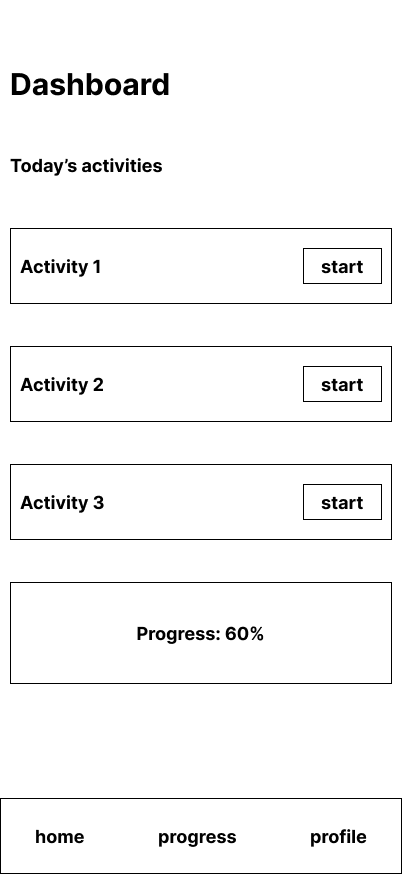
Examples might include:
- Login
- Dashboard
- Activity Page
- Progress Page
- Editor Page (Admin)
Tips:
- You should not worry about visual design (colors, fonts, spacing). Focus on structure.
- Low-fidelity wireframes should look like simple diagrams made of boxes and labels.
- Screens should include the core flow of your stakeholder’s experience.
- You may draw these on paper, in a notebook, in FigJam / Figma, or on a whiteboard (photograph the result). Focus on speed and clarity, not polish.
- Feel free to download and print these paper templates:
Requirements
Sketch at least 5 screens from your screen list.
What to Submit
Submit one document per team containing:
Your document should be clear, concise, and organized. Organize your document so that a reader can clearly see: User Need → Journey → Screens → Features → Wireframes